
Content marketing
Social
Content

1. Introduction
To see their email marketing programmes succeed, email marketers have to solve two problems. They must (a) continually add new, high-quality email addresses to their databases to make their programmes grow while replacing addresses that have been removed from unsubscribes and complaints – this is maintaining list quality – and they must (b) work harder than ever to ensure that their email messages reach their subscribers’ inboxes – this is monitoring deliverability. Without this second step in the process, an email marketing programme is certain to struggle.
This report aims to help email marketers at all levels understand new trends in email acquisition and best practices for growing a healthy, permission-based email database. It also covers how list quality affects every aspect of an email programme, from inbox delivery to legal compliance, and, ultimately, the success of any email marketing campaign.
1.1 Executive summary
- List quality and email deliverability go hand in hand for email success. The higher the list quality, the more likely emails will be delivered to subscribers’ inboxes and the goals of an email marketing programme can be achieved.
- Knowing how much an email address is worth in monetary terms can help the brand understand how effective an email marketing programme has been in achieving the company’s goals and objectives. It also can be used to forecast the impact of investments in email.
- List quality is determined by a combination of factors, including data accuracy, subscriber activity and a good sender reputation with mailbox providers. All three have become far more important over the last three to five years to ensure the health of an email database.
- Permission-based email address acquisition has become the prevailing standard in many countries, but permission is in the eye of the recipient and can be quickly withdrawn.
- Communicating the benefits of signing up to an email programme will answer a potential subscriber’s unspoken question: “What’s in it for me?” It also sets expectations that the brand must work to fulfil in order to retain more subscribers.
- Marketers can create higher quality lists by establishing goals, strategies and tactics that consider list size and email address quality – especially among existing customers – as well as permission, targeting and subscriber or customer response.
- Email and IT teams must share the responsibility for email deliverability. Unfortunately, many marketers do not understand how deliverability works or how successfully their programmes reach their subscribers’ inboxes.
- A company’s sender reputation affects deliverability, as does the email server setup, email volume and being listed on third-party industry blocklists.
- Marketers have many tools and tactics for tracking, managing and improving deliverability, which gives them a high degree of control over their ability to reach the inbox.
1.2 Methodology
This report brings together best practice insights from a range of expert practitioners in the field. The two main stages to the methodology were:
- Phase 1: Desk research to identify relevant issues, examples and models.
- Phase 2: A series of in-depth interviews with a range of email marketing experts.
Econsultancy would like to thank the following interviewees who contributed to this report:
- Tony Allen, Global D2C CRM Lead, Volvo Cars
- Jess Evans-Tudor, Head of CRM, Rated People
- Kelly Haggard, VP – Marketing Innovation, Synchrony
- Jakob Holm, Email Marketing Director, Pandora
- Mar Juárez, CRM Manager, IVI RMA Global
- Beata Linz, Global CRM Director, AdBirds
- Lisa Pettit, CRM Lead Developer, Specsavers
- George Williams, CRM Manager, FARFETCH Platform Solutions
1.3 About the author
 Kath Pay lives and breathes email marketing and is recognised as one of the industry’s leading email marketers. CEO of boutique consultancy Holistic Email Marketing, she devotes her time to developing customer-centric ecommerce journeys using a holistic, multi-channel approach.
Winner of the 2021 ANA/EEC Email Marketers Thought Leader of the Year, Kath is an industry veteran of 23 years. She is the author of the best-selling and award-winning book Holistic Email Marketing, and is a sought after international keynote speaker, blogger, expert contributor and trainer.
linkedin.com/in/kathpay
kath@holisticemail.com
@kathpay
2. List Quality and Why it Matters
Veteran email marketers will remember the early days when email address acquisition was simple. Customers wanted to receive messages in their new inboxes from the brands they loved. With no rules on permission, data protection or privacy in place, many brands bought, traded or otherwise procured lists of email addresses to add to the ones submitted on their own websites.
Unsubscribes were not a problem. For every person who opted off a list, there were 10 or more lining up to get in. Spam complaints and spam blocklists did not exist.
The picture has changed considerably since then. Email marketers have come to learn that a smaller but more engaged list can be more lucrative than a list with millions of unengaged subscribers or one riddled with undeliverable addresses.
Internet service providers (ISPs) and other mailbox providers heeded the complaints from their users and clamped down on senders with high bounce rates and spam complaints, as well as those with irregular sending patterns. Laws including the European Union’s General Data Protection Regulation and Canada’s Anti-Spam Law introduced regulations for collecting, using and securing email addresses belonging to their citizens.
Today, list quality has a direct impact on deliverability, which in turn has a direct impact on whether the brand reaches its campaign objectives, such as generating revenue. For that reason, this guide considers the challenges and opportunities list quality and deliverability present marketers.
2.1 The impact of list quality on deliverability
The ability to reach customers’ inboxes relies heavily on high list quality. High list quality ensures deliverability, the rate at which email messages arrive in recipients’ primary email inboxes – delivery to the spam folder does not count. Deliverability is usually expressed as the percentage of emails the ISP accepts and routes to the inbox.
Having a good deliverability rate is essential for email marketers: while email users regularly check their inboxes, they do not check their spam as often. The DMA’s 2023 Consumer Email Tracker found that 66% of email users check their inboxes at least once a day (up from 58% in 2018).[1] Fewer are checking their spam folders daily (40%, down from 46% in 2021), as seen in Figure 1 below. Hence, they are unlikely to rescue any wanted messages that go to spam. For this reason, it is key that marketers prioritise list or data quality to ensure they are reaching the inbox.
Figure 1: Percentage of consumers who check spam folders hourly, daily, weekly or less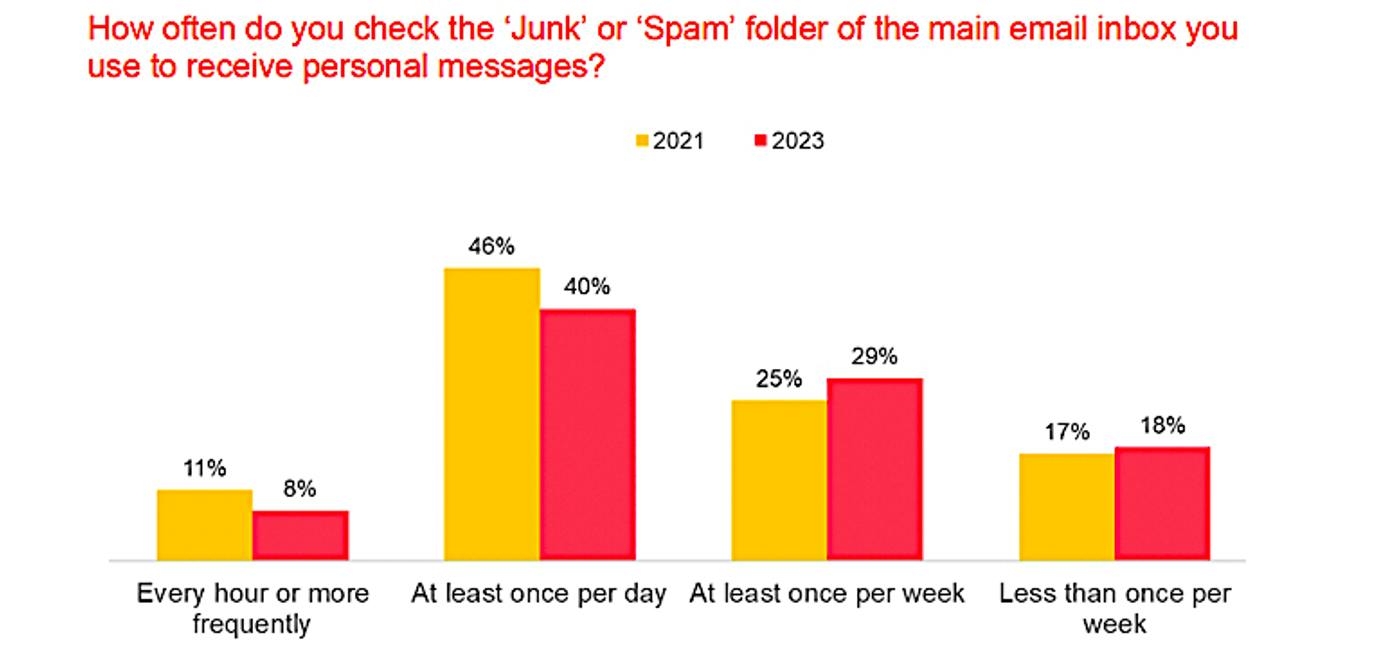
Source: DMA[2]
2.2 Maintaining list quality to ensure deliverability and engagement
List quality is measured by the amount of accurate data, subscriber activity and contributions to a positive sender reputation with mailbox providers. All three have become far more important over the last three to five years to ensure the health of the email database.
As time passes, the accuracy and validity of email addresses in any list will decline. To maintain – or improve – list quality, marketers must take steps to:
- Identify email addresses that perform consistently well and get more of them.
- Identify and remove obsolete and invalid email addresses.
- Filter out email addresses that over time do not engage.
- Improve on the accuracy and performance of all aspects of the email marketing programme.
Managing list hygiene has become easier to achieve. List hygiene and management services such as AtData,[3] Kickbox[4] and Validity[5] perform traditional list-cleaning services and offer real-time validation at point of entry, which goes much further in keeping bad data out.
Meanwhile, laws and regulations governing data acquisition have also curtailed the use of covert practices such as buying lists from unverified sources and harvesting email addresses from websites and other public locations.
Deliverability rates vary widely by country, which may be due to differences in list acquisition practices and – by extension – list quality. Validity’s 2023 Email Deliverability Benchmark study sampled global inbox placement rates and showed a wide range from a low of 69.8% in India to a high of 97.8% in Germany.
“Although the global [mailbox provider] landscape is dominated by Microsoft, AOL, Gmail, and Yahoo… we still see distinct regional variances in inbox placement rate,” the report noted. “These variances illustrate the influence of local MBPs [mailbox providers], as well as laws and customs that influence the quality of data collected by email programs in these countries and regions.”[6]
2.3 The value of an email address
Every email address in a company’s database has a cost and monetary value. The cost represents what the company has spent to add it to the database or to retain or reactivate it. Knowing the value of the email address can help marketers understand the value an email marketing programme might deliver the company. It can also be a yardstick for measuring the anticipated cost or return on investment in email. The total value of the email address reflects the monetary value generated by the address owner through purchases or other financial transactions minus the cost of acquiring the address.
In the days when list-buying was an accepted practice, the average cost of an email address was the total expense of acquisition divided by the number of mailable addresses. Although list-buying is no longer an acceptable practice, even organic opt-ins – those the brand or company acquires on its own from volunteer sign-ups, account, event or download registrations, content entries and the like – have a cost if the company uses paid media to drive traffic to a website, or offers a purchase discount, free or discounted services, asset downloads and other incentives.
2.3.1 Calculating the value of an email address
When deciding how much time and money to invest in list quality and acquisition, a good starting point is to calculate the average value of an email address. This can have several additional benefits, including allowing email marketers to:
- Estimate the ‘cost’ of unsubscribe rates and help calculate the true cost of badly targeted campaigns.
- Monitor acquisition campaigns, setting maximum acquisition costs for different channels.
- Quantify the value of cleaning and ‘update my details’ campaigns.
To make informed decisions about tactics like acquisition and reactivation, it is essential to establish whether the value of these addresses outweighs the cost of acquiring or reactivating them. Marketers must know the value of these addresses if they want to align budgets accordingly.
Applying the learning: Three areas to consider when evaluating email address value
-
- Customer lifetime value: While customer lifetime value is not always easy to determine, it certainly provides one of the most accurate ways of gauging the value of an address.
.
Multiply a customer’s average spend on a given transaction by the number of transactions in a year. Then apply a factor representing the number of years the customer is active for and whether transaction frequency goes up or down. Finally, subtract servicing costs and apply any other assumptions (e.g. crediting customers who act as advocates for goodwill).
.
This is useful for transaction-oriented companies such as retailers, but it can be harder to apply to publishers or lists largely comprising new clients or prospects. For a detailed discussion of customer lifetime value, see Econsultancy’s Customer Lifetime Value Best Practice Guide.
- Customer lifetime value: While customer lifetime value is not always easy to determine, it certainly provides one of the most accurate ways of gauging the value of an address.
-
- Acquisition source: If the true value of an email address has not been calculated then the costs of acquiring that email address in the first instance can be used as a proxy. For example, emails acquired through partner co-registrations might cost more to acquire than those acquired via the brand website. Thus, marketers can use the acquisition source as a factor when determining the value of an address.
- Relative value: Use a combination of sources. For example, publishers could assign aggregate sponsorship ad revenues across the active portion (openers and clickers) of their lists.
Calculating the value of an email address can be simple or extremely complex. Either way, it is fundamental to the brand’s ability to make the right targeting decisions, so that they can allocate budget to the best activities and increase revenue from email.
Holistic Email Marketing
3. List Growth and Email Address Acquisition
Email lists can be grown in one of two ways: fast or slow. While the business might prefer ‘fast’, it could come at the expense of list quality. Many experienced marketers will assert that fast growth happens when the acquisition process is less particular about where those addresses come from. Slower growth, while perhaps not the preference of others within the company structure, often yields higher quality subscribers.
Advancements in segmentation and targeting automation, along with the impending loss of customer data from third-party cookies, make it more important than ever that the first-party data collected from subscribers and customers at opt-in is comprehensive and accurate. Where an email address comes from is a valuable example of such input data and could have a significant effect on content and response rate.
This first-party data comes from email records that include email address, personal identifying information such as name and location, date and time of opt-in, subscriber preferences, customer behaviour and the like. (See Email Marketing Best Practice: Segmentation and Personalisation for a discussion of this concept.)
3.1 Establishing a permission-first approach
A permission-first email approach is one of the few best practices that most email marketers can agree on, although some countries, including the US, let companies send marketing or promotional emails without permission being granted first.
Most email regulations around the world distinguish between promotional messages and transactional emails, which pertain to business conducted with a customer. Transactional messages are often granted more latitude in terms of the level of permission required. Companies that appear to stretch that relationship beyond the transactional intent have been fined under provisions of regulations such as the European Union’s General Data Protection Regulation (GDPR).
Ultimately, permission is in the eye of the recipient. A sender might believe it has received permission, but if recipients consistently mark those emails as spam, mailbox providers are likely to block those emails.
There are six general levels of permission:
- Opt-out: This is the lowest level of permission a subscriber can provide: rather than explicitly opting in, they are given an option to opt out. A sender sends promotional messages to email addresses it has collected from a range of sources, including online forms that do not include a permission request, by purchasing or renting email lists, or through email appending. (Appending is the practice of adding or changing incomplete or out-of-date details about customers by matching them against other databases.) Recipients must unsubscribe to stop them from coming. Most countries or federations that have regulations governing commercial email prohibit opt-out email unless the company can establish it has a prior business relationship. However, even if such a relationship exists, it is best to secure permission as quickly as possible to avoid spam complaints or potential legal issues.
- Single opt-in: The subscriber gives permission by supplying an email address on a form. The address goes live in the sender’s database almost immediately and is available for messages without any checks on the address validity.
- Single opt-in with validation: The subscriber provides the email address, but it does not go live in the database until a script on the website validates it with a process that checks for spelling errors and syntax malformations. This kind of script can approve or reject the address in real time at opt-in and allow the user to correct a mistake or choose a different address.
- Single opt-in with confirmation: The subscriber receives a confirmation email that verifies the email address is correct and belongs to a valid account. The address goes live in the database as soon as the email is delivered successfully.
- Double opt-in (DOI): The subscriber must respond to a confirmation email before the address goes live in the database.
- Double opt-in with CAPTCHA. This is the process with the most friction, and thus the most user-unfriendly. It combines DOI with a ‘prove you’re a human’ test, such as inputting letters and numbers in a form or clicking parts of a picture.
Rethinking double opt-in for permission
Many email advisers say DOI is the best way to validate email addresses, but it has a major downside. The drop-off between opt-in and confirmation can be significant if recipients do not receive or act on the confirmation email. Consequently, list growth can be hampered, and people who genuinely want to receive a brand’s emails will be shut out.
There is some disagreement over whether DOI is a legal requirement. Google Ads says double opt-in is required in Austria, Germany, Greece, Luxembourg, Norway and Switzerland,[7] although other sources, such as deliverability manager Validity, maintain that they recommend but do not require DOI. However, court judgments have upheld DOI as the highest proof of permission.[8]
DOI emails are not required under the US’s CAN-SPAM Act, Canada’s Anti-Spam Law (CASL) and GDPR. CAN-SPAM permits opt-out in all circumstances for email, while CASL and GDPR require a single opt-in in most cases. One exception under both sets of regulations is emailing as a result of a previous business relationship.
Opt-in legalities aside, the opt-in process a marketer decides to use will depend on how the company acquires addresses. Companies that rely heavily on third-party acquisition or tie opt-ins to incentives or content entries can be more vulnerable to invalid or faked email addresses as well as spam complaints or lawsuits for violating regulations governing permission. In cases like these, a restrictive approach, such as real-time validation at opt-in or double opt-in might best protect the company’s database.
3.2 Optimising the opt-in process
Ultimately, list quality cannot be achieved if the methods used to collect email addresses and customer data attached to them are outmoded, ineffective or counterproductive. Yet that is what many email marketers today rely on for this most essential first step in building up a reliable database of fresh and accurate email addresses.
Many retailers fail to capitalise on opportunities available to collect email addresses, such as using the classic opt-in (i.e. sign-up) form or newer approaches including the ‘popover’ data collection forms timed to launch at strategic points in the customer journey. See Section 3.2.2 for a discussion of popover styles and recommendations.
Brands must communicate the benefits of opting in. To do this effectively, they must collect customer data either at the point of entry or in follow-ups through methods such as progressive profiling, which uses a series of emails to gather essential data without overwhelming customers with an intimidatingly long registration form.
3.2.1 Providing email sign-up forms
Brands that take the following steps will find their sign-up forms become more effective at gathering a steady supply of high-quality email addresses.
- Put the email sign-up form at or near the top of the homepage, close to the prime visual territory. A prominent placement can be accompanied by text that expresses the value proposition of signing up.
- Assess the value of offering a subscription incentive. Many brands offer incentives to sign up for email but then place the subscription form at the bottom of the page. This sends a mixed signal: The email opt-in is valuable enough to offer a margin-lowering incentive – but not valuable enough to put in prime viewing real estate on the homepage. Placing the sign-up form in a prominent position can reduce the need to offer incentives. (Note: This would be a good subject for the web team to test.)
- Place the sign-up form away from social media links and other destinations. When building an effective email programme, it is essential to avoid distracting customers with competing links.
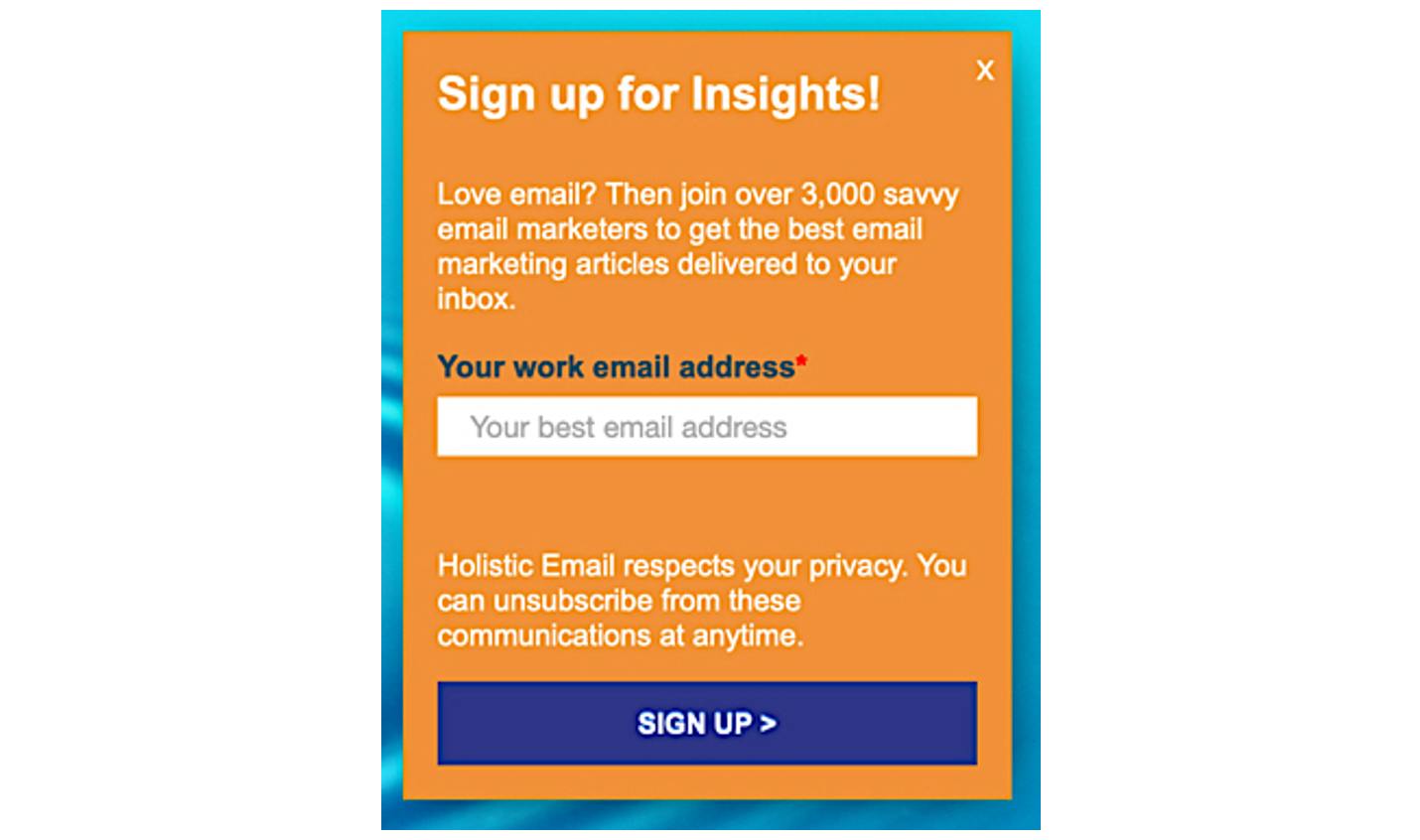
- List the sign-up benefits clearly. Subscribers are asking themselves “what’s in it for me?” when deciding whether to opt in. They need to see the benefits – saving money, getting VIP offers, being first to learn of new products or events, etc. Figure 2 shows a succinct benefits description, which includes the most recent number of subscribers as a form of social proof.
Figure 2: Adding a conversational statement of subscription benefits at opt-in
Source: Holistic Email Marketing
- Test to find the right balance of information required at opt-in. Is an email address enough to start a meaningful relationship? Many marketers miss the opportunity to begin engaging because they do not ask for more information. Others ask for too much information and potentially scare off interested customers. Testing and progressive profiling (see Section 2.3) can help find the sweet spot of when and where to ask for information needed to begin segmenting and targeting messages or complying with data laws.
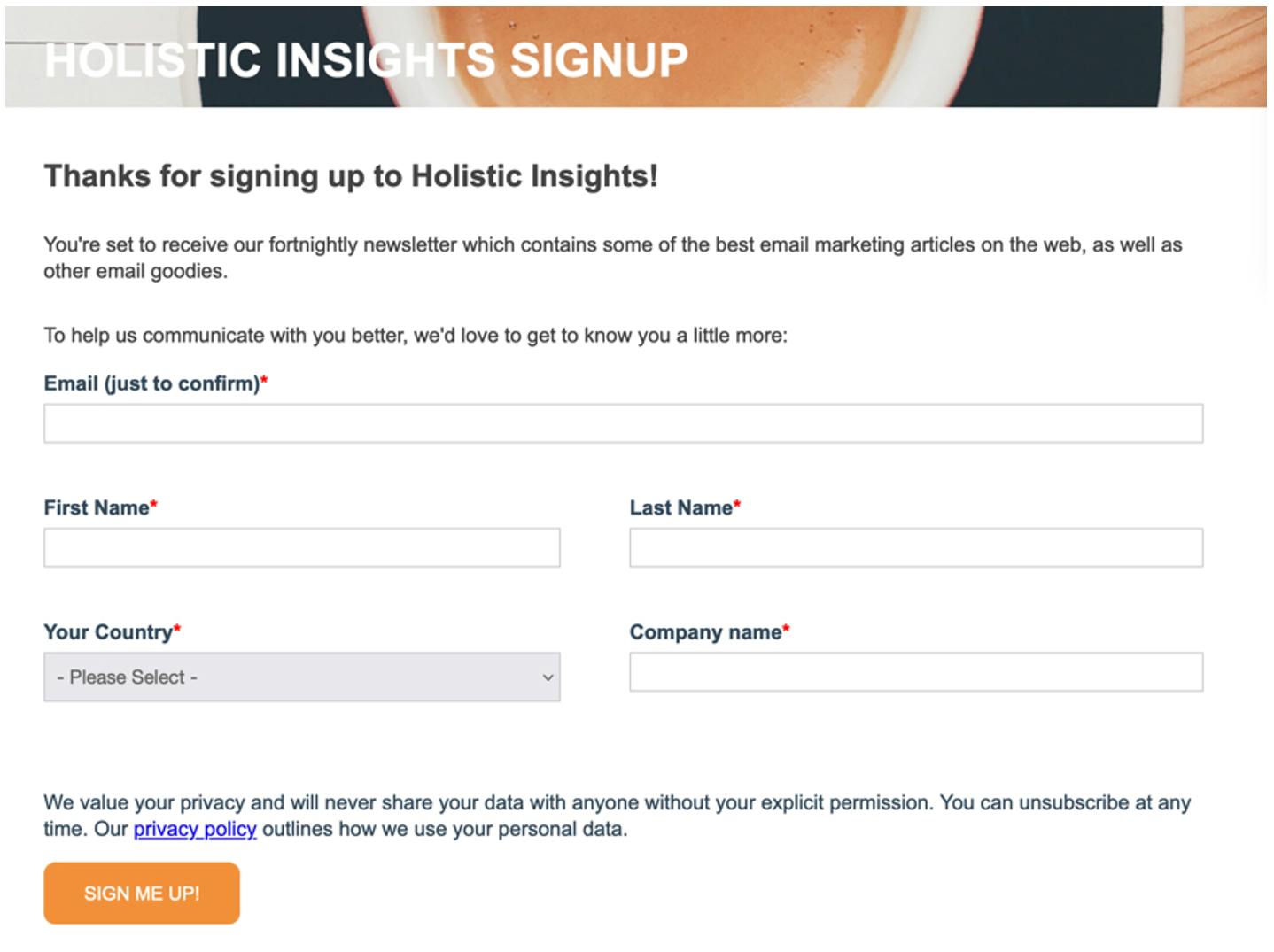
Having prompted users to submit an email address, as illustrated in Figure 2, a second form could be used to collect further information as part of a progressive profiling series, as in Figure 3. This second step is optional.
Figure 3: Request for more subscriber information at opt-in
Source: Holistic Email Marketing
- Avoid the ‘S’ word. ‘Submit’, ‘subscribe’ and ‘sign up’ might meet the technical requirements in a call to action button, but they fail to advance the value of the email programme or tell the user what to do next. Terms like ‘Check your inbox’ or ‘Start saving’ are better relationship builders. Even a simple ‘Sign me up’ can work well, as seen in Figure 3
- Work with the web team, content/product managers, the ecommerce team and other stakeholders to resolve disputes over form ownership and placement. In many companies, the email team is charged with list acquisition and hygiene, but the web team oversees form placement and design.
3.2.2 Using popovers
Popovers, also called interstitials, modals, lightboxes or overlays, are website-based devices that can capture the page visitor’s attention when they are viewing or about to exit a webpage. Used properly, they can be effective for email address acquisition because they are more noticeable than static form fields and have more room in which to explain the benefits of opting in or offer an incentive for joining the list.
Popovers should not be confused with pop-ups, which are often the target of pop-up blockers. Pop-ups are new window, while popovers are part of the original webpage. In most cases, popovers do not face problems with pop-up blocking devices, which can prevent auxiliary webpages from opening automatically. They can appear the moment a visitor lands on a webpage, after a set time for the visit, or when the page detects a move to exit.
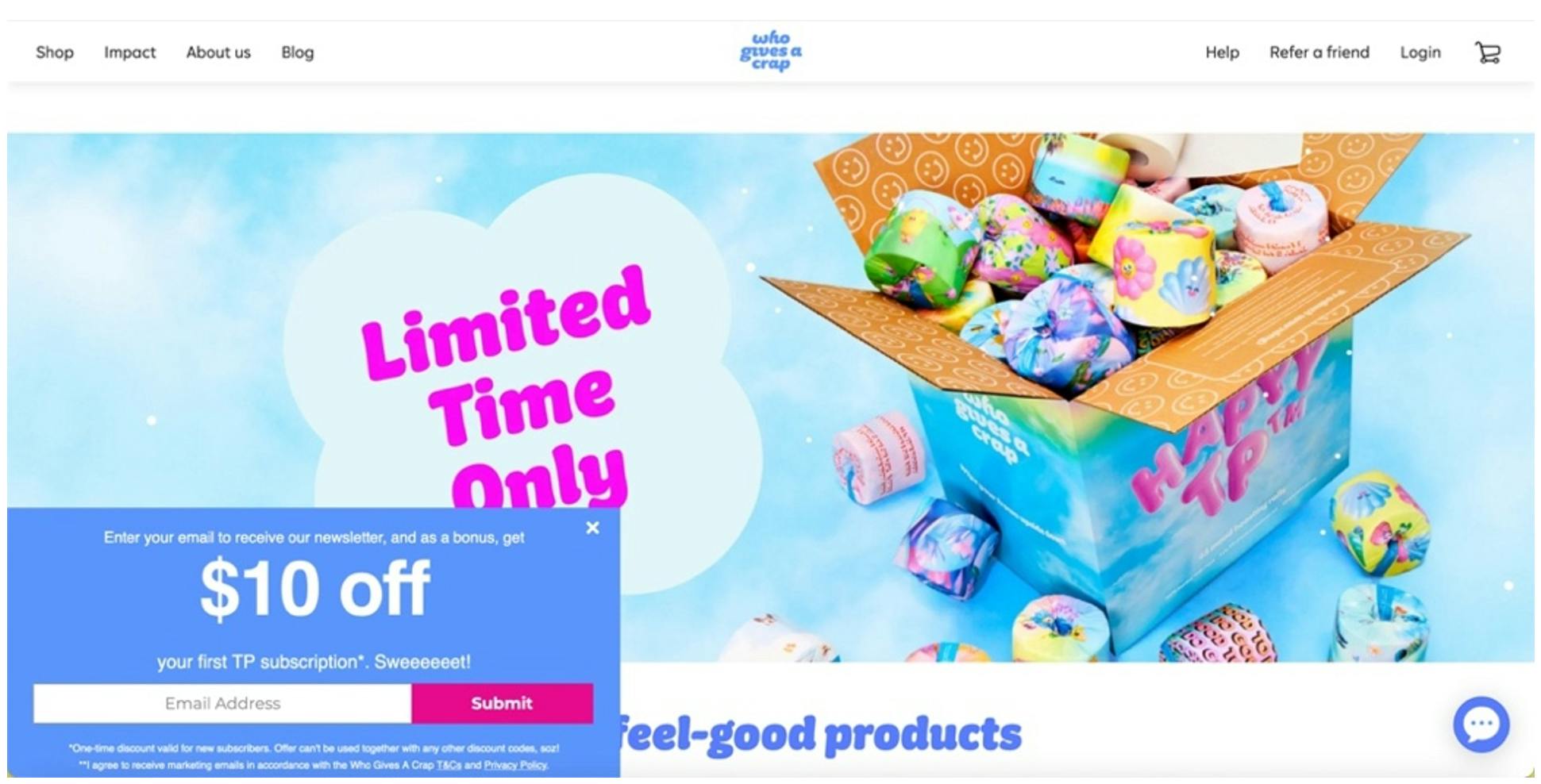
Several approaches for popover windows are seen in Figures 4–7. They illustrate different treatments for email acquisition, both in placement and goal. In Figure 4, the popover appears several seconds after the visitor lands on the page and is stationary in the bottom left corner of the page.
Figure 4: Bottom placement for popover
Source: Who Gives a Crap
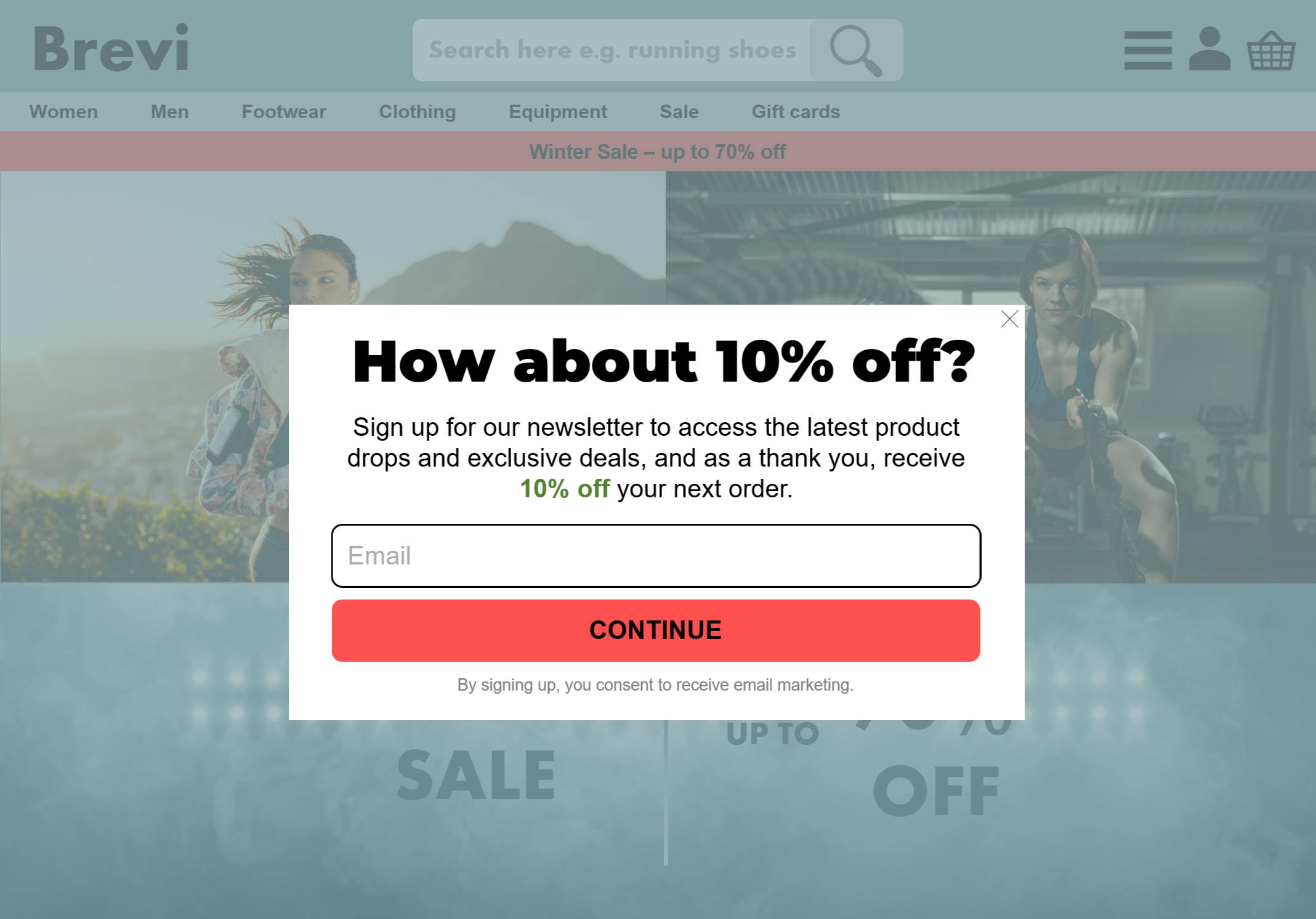
The following three images illustrate the popover experience as a visitor browses an ecommerce website. Figure 5 is likely the most common treatment for an acquisition popover. It appears shortly after the visitor arrives on the site, asks only for an email address, and leads with the incentive. The promotional copy under the headers sums up the value proposition and adds the incentive’s monetary value. The popover also includes a proviso clarifying that acceptance means signing up for promotional messages.
Figure 5: Popover 1, covering web copy
Source: Econsultancy
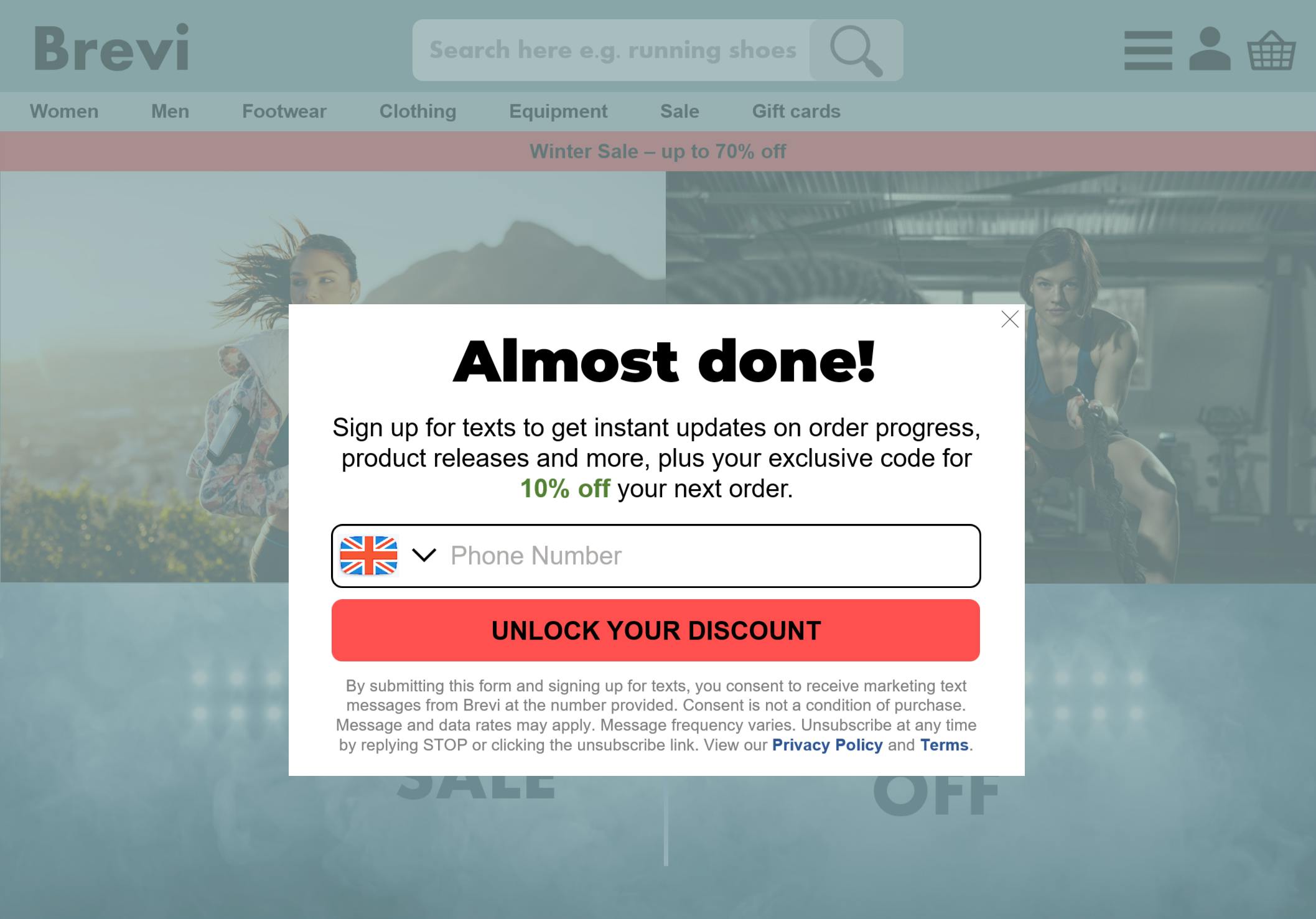
In Figure 6, clicking “Continue” on the red CTA button in the first popover brings up a second popover asking for the visitor’s mobile number for SMS messages. The copy is similar but includes small-print language explaining terms and conditions and linking to the brand’s privacy policy.
Figure 6: Popover requesting mobile phone number for SMS messaging
Source: Econsultancy
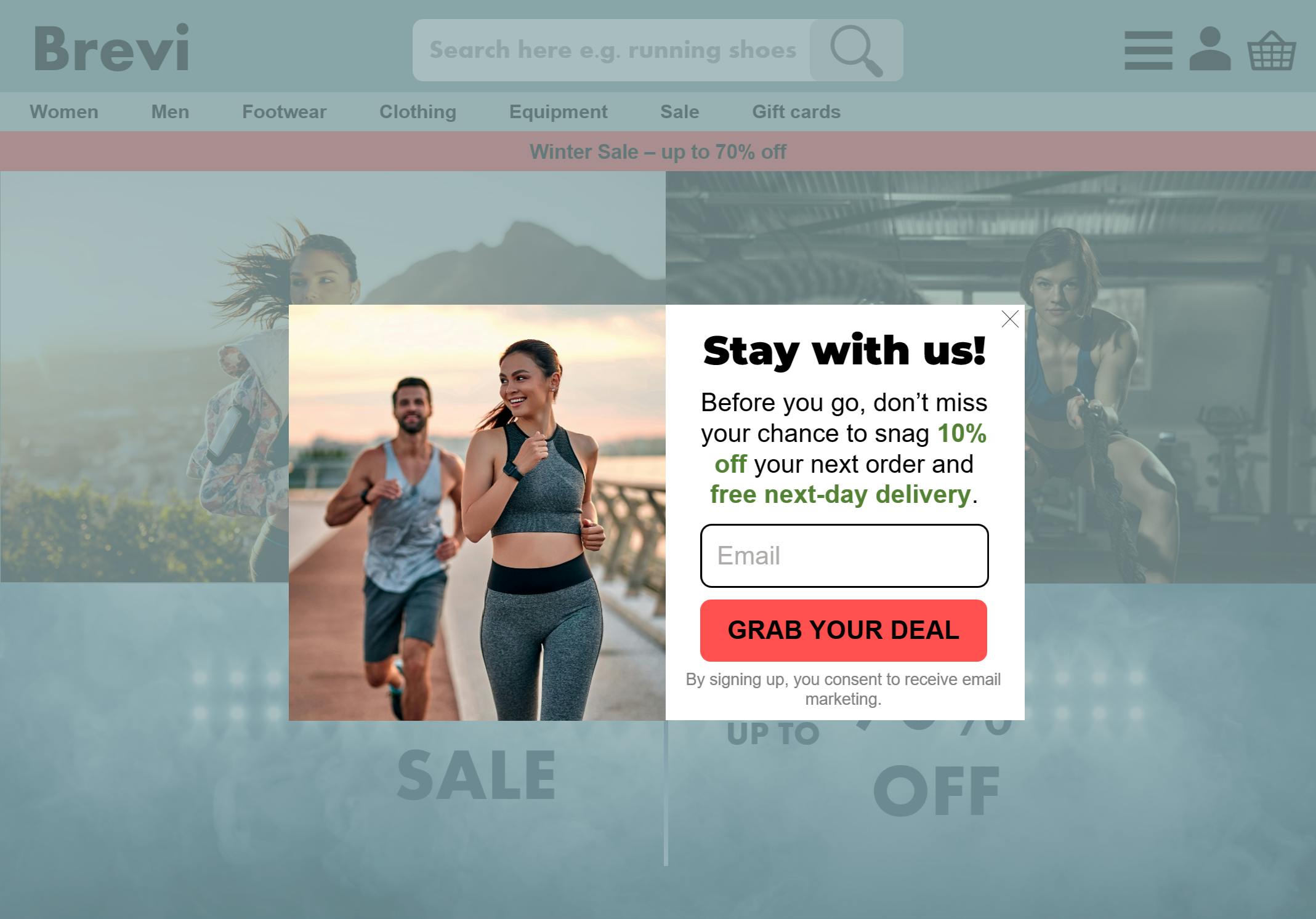
Figure 7 shows an exit-intent popover that launches when the page detects movement to close the page without opting in. It adds an extra incentive to persuade the visitor to subscribe.
Figure 7: Exit-intent popover that adds incentive for signing up for email
Source: Econsultancy
Although popovers are designed to be less obtrusive than the pop-up windows of old, there are ways marketers can optimise their use to increase their chances of securing the opt-in without annoying their customers:
- Do not cover the entire screen with a popover. It is meant to be a small, attention-getting device; it must not detract from the user’s ability to view other content on the page. Keep the content of a popover short and include only necessary information.
- Serve one popover at a time. On a desktop view, multiple popovers in different places on the screen could make the page look cluttered, making for a less than optimal customer experience.
- Make the box easy to close. Do not force page visitors to waste time hunting for a device like an ‘X’ to close the window. If they are not interested in opting in, being unable to easily close the popover creates a negative experience.
- Repeat essential information in email or SMS follow-up messages. Subscribers might overlook key points, especially for SMS messaging, in their haste to fill in the data fields or close the popovers.
3.2.3 Building customer profiles with subscriber data
After establishing key data collection points, it is important to have a ‘common customer profile’ of required fields.
A common customer profile defines the full range of profile information that can be collected about a customer, including their contact details, preferences, responses and purchase behaviours. It combines information supplied by customers with data the company collects through analysis.
Marketers might be tempted to collect as much data as they can from their new customers so they can begin the process of segmenting them into appropriate customer groups for targeting and start studying their shopping and spending habits. However, marketers must resist the temptation to ask for too much information at the start of a new email relationship.
In order to gain a maximum number of permission-based subscribers, it is generally recommended to gather only the data necessary for emailing the customer. This would cover the email address as well as one or two other items that can help the customer engage successfully from the beginning, such as postcode.
The information a brand gets to know about a customer can be categorised into three levels, which are as follows:
- Level 1: Email address and contact details such as name.
- Level 2: Basic characteristics for targeting such as location, job title, age, gender, and other preference data.
- Level 3: Knowledge of response and purchase behaviour linked to email account.
Questions that seek to elicit information about customers’ personal or professional attitudes and values can be very revealing and assist in targeting or refining message streams, such as drip sequences used in B2B lead qualification processes. This is discussed in detail in Econsultancy’s guide to Email Marketing Best Practice: Segmentation and Personalisation, Section 3.1.
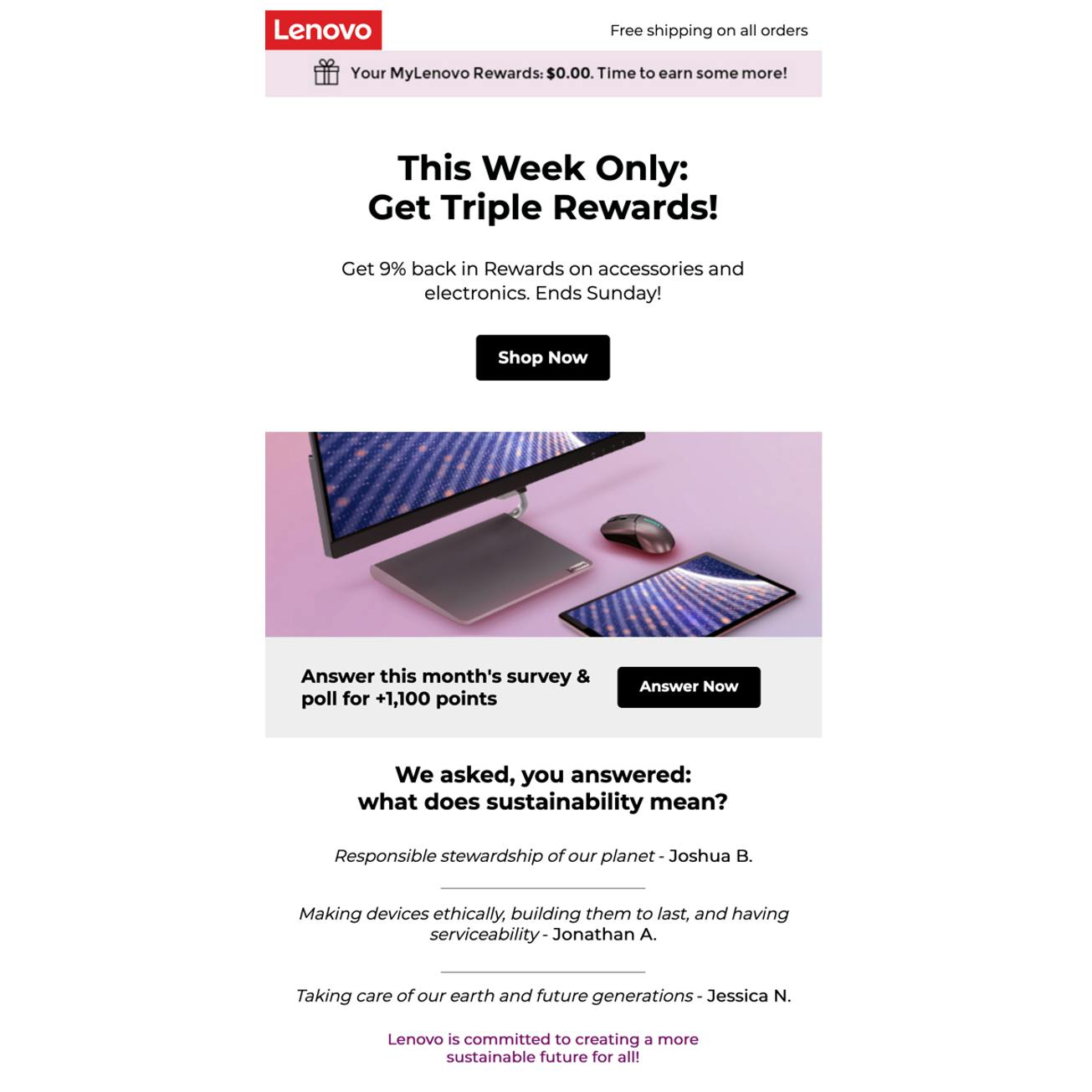
These questions can be asked in one- or two-question polls added to regular email deliveries. An example is the poll question included in each update email sent to members of Lenovo’s My Lenovo Rewards programme, as seen in Figure 8 below.
Figure 8: Invitation to complete a poll for email subscribers: “Answer Now”
Source: Lenovo via MailCharts[9]
Progressive profiling involves adding information to profiles incrementally to get a better picture of customers. For example, marketers can collect data from welcome or post-purchase emails and add it to customer profiles when they monitor clickthrough on links or invite recipients to go to a landing page and disclose preferences.
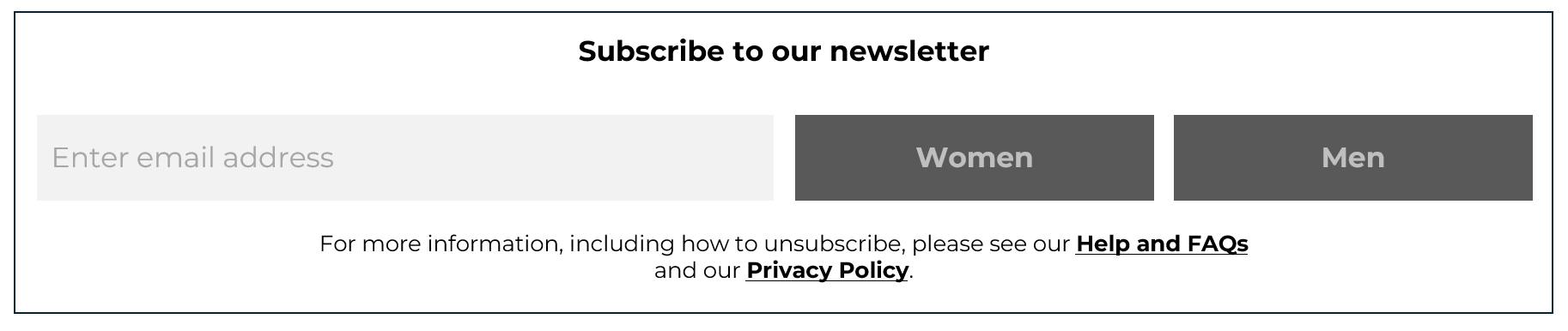
Figure 9 is an example of a simple form for a retailer that represents the first step in a progressive polling series. As well as providing an email address, customers are asked to select which clothing collection they would like to receive communications about.
Figure 9: Example of the first step in a progressive profiling form
Source: Econsultancy
Applying the learning: Five dos and don’ts for capturing customer email addresses on retail websites
- Do watch time spent on site. Most people browsing a site for the first time are in exploratory mode, and need time to get to know a brand before committing to email capture. Consider the channel and source customers are using to come to a website and how much they might know about a brand. New visitors, for example, might need three or four page views before agreeing to sign up for an email programme.
- Do not spam customers with email requests. Retailers must be able to recognise the shoppers that are already in their CRM; that way, they will know that they already have the shopper’s email and do not need to deploy an email capture overlay. If they do not, and deploy an overlay for those whose email addresses they already have, shoppers may feel as if the brand does not know them or respect them as individuals.
- Do read customers’ behaviour. Watch for telltale signs of high customer intent, such as time on site, browsing product descriptions, looking at reviews, available clothing sizes, product images and placing items in a basket. These are signs it might be the right time to serve an exit-intent overlay asking for the email address.
- Do offer a fair value exchange. Offering a discount or other incentive might not be the best tactic to persuade customers to share their email addresses. Consider other options such as offering to save items in a basket, let customers know when out-of-stock items are available or offer exclusive content related to the products browsed, such as FAQs or buyer guides.
- Do not stop at collecting the email address. This is just the start of the journey. Look for opportunities to use the address to market one-to-one with customers and to connect with them across devices and channels.
Holistic Email Marketing
4. Maintaining List Quality
Having established a permission-first approach to email address acquisition, it is then key to ensure the data is correct and to provide customers with customisation options to discourage unsubscribes and spam complaints. This helps to maintain the list quality.
4.1 Establishing a system for data correction
At the very least, a hard bounce indicates a message has not been delivered. Depending on the context, a few practices could reveal much more about the reason why the email failed. An effective process for handling data correction should include the following steps.
- Check for typos
A low-tech method for avoiding these errors is to require subscribers to type their email addresses twice: once to enter the data and twice to confirm. However, this adds a second step to the process that could frustrate users typing on mobile screens. Also, some users will copy and paste the original address into the confirmation field, simply repeating any errors in the first entry.
Real-time validation processes should be added to the fields where the data is being entered, especially if it is being keyed in from written information or added by staff in a retail environment.
Real-time verification services can check an email address against a database of valid and safe email addresses. They can keep out addresses that are mistyped, from an unwanted domain, were previously unsubscribed or have been associated with repeated spam complaints and other problems. These services let the subscriber retype the address, replacing a low-value address with one they value more, or break off the connection.
This might seem harsh, but a subscriber who wants something from an email programme while unwilling to provide a legitimate or valued email address will likely not be a high-value or long-term customer.
- Validate before sending
To improve deliverability and help protect marketing emails from being flagged as spam, carry out validation checks before sending. This can be a powerful way of pre-empting hard bounces and hitting spam traps (email addresses thought by ISPs to be inactive). Section 5 discusses spam traps in further detail.
A number of tools that use a real-time validation service to check addresses for typos, incorrect construction, low-value ‘throwaway’ address services, frequent complainers, previous spam complaints and other potential threats.
- Follow up on hard bounces
Regularly check your organisation’s follow-up processes for hard bounces to regain consent, particularly in a B2B setting where a hard bounce often indicates someone has left a role. Alternatively, create a follow-up process so that hard bounces or inactive addresses can be flagged to staff who deal with customers directly, such as sales representatives or contact centre staff. They can then request the current email address.
- Seek out and remove problematic addresses
Real-time validation and other tactics can keep out incorrectly formatted email addresses, but they will not reveal addresses that are accurate but not deliverable, or deliverable but problematic, such as those belonging to throwaway or one-time-use services or addresses that are potential spam traps.
It is essential to identify and quarantine these addresses because they represent no value to the email programme and can even represent a threat to list quality and the brand’s reputation as a legitimate email sender.
- Carry out data correction campaigns
Marketers can use direct mail to refresh email addresses, perhaps by using postal inserts as part of another campaign, while some consumer sites may find it useful to remind users to update their details when they log in. Brands that have mobile numbers in subscriber records and permission to contact can use those to alert subscribers to delivery problems.
- Do not take delivery for granted
Ecommerce companies may believe they are enjoying the benefits of comparatively accurate email records for current customers. However, note that some of the email addresses that customers supply – in order to get a receipt, for example – may be old ones they no longer check. Such email addresses, although accurate, will not show up on bounce reports, and might be next to useless for engagement.
- Be sure not to overwrite with bad data
When adding customer data from multiple sources – or carrying out a data correction campaign across a large number of customers – some logic will need to be applied before overwriting existing contact details. For example, if the current record has shown recent signs of activity and responsiveness, then overwriting with new data might be a mistake (either a mistake in the spelling of the address, or a ‘mistake’ in that a customer has provided an address other than their main address).
- Prevent a list quality problem before it happens
Rather than resorting to winning back the customer’s permission or attention, it is much better to remind subscribers why they should keep their address up to date. This can be accomplished by showing them what they will miss if they do not take the extra step to remain in touch. This approach can also help to improve deliverability rates, as sending emails to too many ‘unknown users’ can result in a high volume of bounces, a common spammer signature that can prompt a mailbox provider to flag emails as spam or filter them out.
- Offer people a choice
It is a fact of email marketing that subscribers’ and customers’ interests, needs and preferences change. Making it easy for subscribers to either opt out of the list or to update their subscriptions or accounts can encourage them to remain active.
Instead of giving subscribers a one-click opt-out, offer them options such these:
- Receive fewer emails
- Pause emails temporarily
- Opt out of specific kinds of emails such as holidays (see Section 4.2)
- Opt into other newsletters
- Change interests
- Receive messages via other channels such as social media, mobile app, SMS or direct mail.
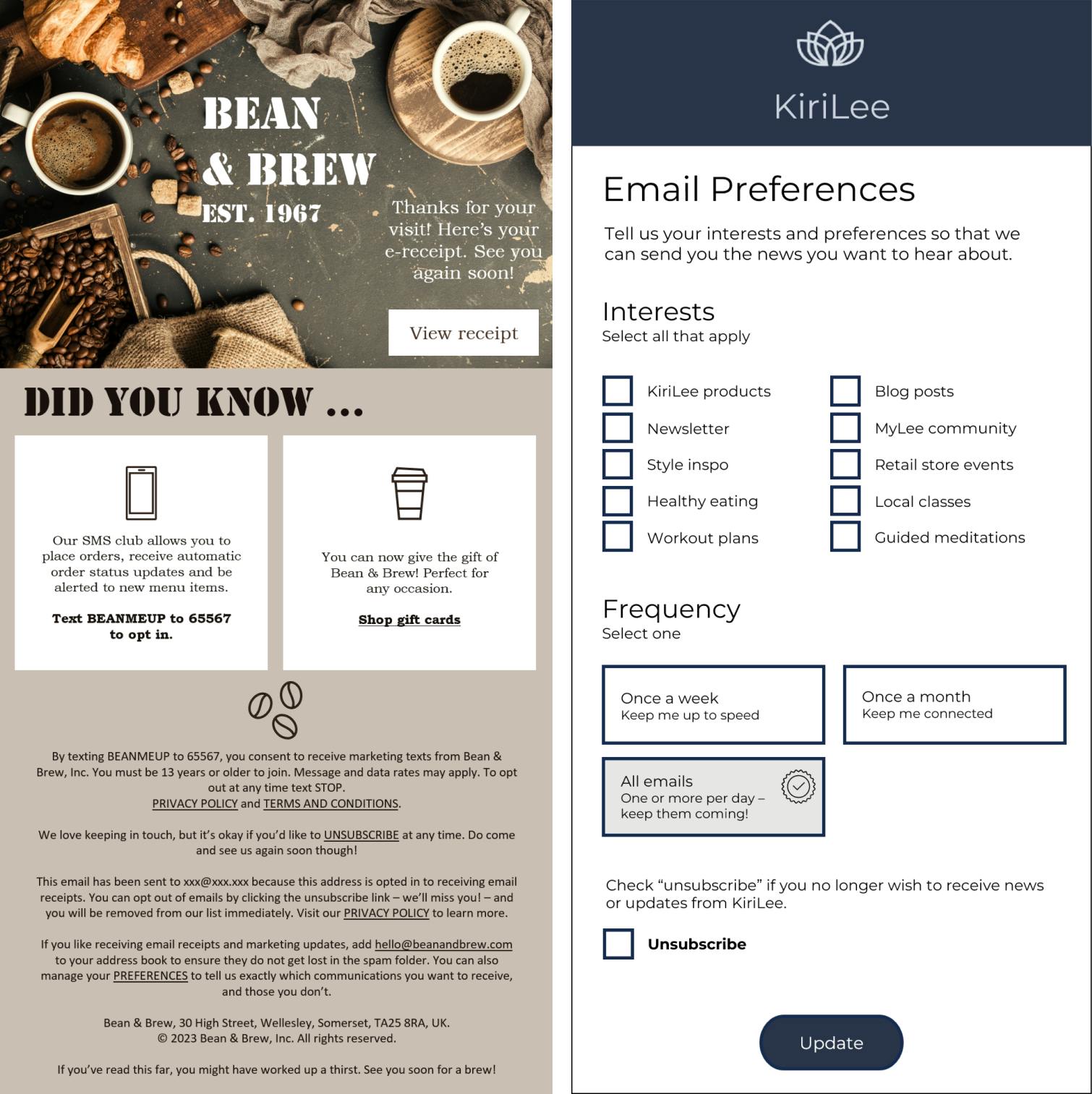
It is common practice to include a preference centre link and an unsubscribe link in the footer of an email, as shown in Figure 10 (left). Subscribers can then be taken to a preference centre page (right), where they can select the type of communications they want to receive as well as the frequency with which they want to receive them.
Figure 10: An example of a preference centre link in a footer and a preference centre
Source: Econsultancy
4.2 Providing opt-out options
In 2019, UK florist Bloom & Wild sent an email with the subject line: “Want to opt out of Mother’s Day emails? No problem.” The company recognised that Mother’s Day could be a difficult day for many customers and partnered with customer engagement platform Braze to allow customers to opt out from Mother’s Day email campaigns and receive other messages instead.
This move, which was part of Bloom & Wild’s empathetic, customer-centric approach, was popular with customers. A 2020 case study by Econsultancy reported 18,000 customers opted for the alternate messages out of Mother’s Day communications. The campaign also received 5x more positive customer feedback than its campaign average.
Since then, Mother’s Day temporary opt-outs have become popular among ecommerce marketers and consumers alike. The number of holidays customers can choose to receive alternative or no messaging has expanded to include Father’s Day, Valentine’s Day, Back to School and Grandparents’ Day.
A 2022 study by Capterra studied consumer attitudes to these emails, finding:[10]
- 81% said they would buy from brands that send holiday opt-out emails.
- 68% of respondents said brands should “prioritise consumer wellbeing over sales”, especially during the winter holidays.
- 39% said they always or usually take the opt-out.
- Generation Z consumers and men are more likely to take brands up on their opt-out offers.
Although these temporary opt-out moves generally win praise for empathy, some marketers have begun to question whether there is a better way to combine customer care and efficient marketing.
The temporary opt-out introduces a negative element to the brand-customer relationship because it is giving customers the option to say “no” to brand email, even though it for only a short period. They also add to the email workflow, both to set up and manage and to account for country-by-country differences in dates for holidays like Mother’s Day and Father’s Day.
Opt-out programmes should meet customer needs while helping the email team continue to meet its revenue and engagement goals. Before deciding to implement such a programme, marketers should analyse customer attitudes and email activity as well as review the team’s workflow and ability to produce acceptable alternative content.
Applying the learning: Test and develop a holiday opt-out programme
Brands that decide to develop a holiday opt-out programme should take the following five steps as part of the testing and development process:
-
- Survey customers first with a short poll question added to a standard email campaign.
- Add a holiday or event opt-out offer to the welcome/onboarding programme.
- Frame the opt-out offer as a general preferences request.
- Test the opt-out programme on one holiday to determine whether customers act on it and whether it affects their email behaviour after the opt-out ends.
Compare the temporarily opted-out customers with the balance of the email list to assess impact on email behaviour and revenue during the opt-out period.
Holistic Email Marketing
4.3 Implementing a reactivation programme
A reactivation programme is designed to bring back formerly active customers who are on the verge of churning or who might have moved on to a competitor.
Although improving list quality is not the primary motive for moving customers to a reactivation programme, it can achieve significant results if newly reactivated customers begin opening, reading and clicking on email messages again.
When customers are reaching the outer edge of a buying cycle, a reactivation email can be sent. Instead of simply relying on a text link buried deep within the email’s footer, customers can be presented with easily clickable icons, effectively creating an in-email preference centre. Options could include a coupon or reward incentive for customers who want to continue to receive emails, a snooze or unsubscribe option to let churned customers pause or delete their email subscription, or options to customise their subscriptions so that the communications are more relevant to them.
Consider creating email programmes with messages calibrated either to rekindle interest in the brand’s products or services, or prompt them to unsubscribe or change email preferences, both of which are more desirable than an unresponsive email address.
The following steps can help marketers reaching out to lapsing or lapsed customers:
- Establish a goal
A reactivation programme is not intended merely to keep sending people emails. It aims to convert past purchasers back into active customers. Example goals might be to focus on reactivating 20% of lapsing or lapsed customers in a year, or raise 10% of email revenue from reactivated customers.
- Decide who will receive reactivation emails
Define what it means for a customer to be ‘at risk’ of lapsing. Lapsing customers could be those who are at or near the end of a typical buying cycle. If the normal buying cycle is every 90 days, customers who have not purchased again on the 98th or 99th day post-purchase might qualify as lapsing. Other considerations such as order value, time on list, or buying habits can also factor into the criteria.
Companies can then use their CRM to identify all customers who match the criteria and send their reactivation emails to those customers.
- Structure the reactivation email journey
Establish the number, sending pattern and content for the reactivation emails, and decide whether to offer an incentive for re-engaging. Testing can help determine the optimal choices. Also, consider suppressing reactivation programme participants from regular promotional campaigns by removing anyone who purchases or shows other positive activity while the programme runs.
- Emphasise benefits of returning
Use subject lines, preheaders and message copy that make reactivation emails stand out from business-as-usual emails. They should speak to why customers fell away and what benefits they will get by returning. The overall tone should reflect the brand voice and focus on customers’ needs and wants.
Do not expect conversion rates that compare to top-performing email programmes. A reactivation email might generate only a 1% to 2% conversion rate compared with the 25% to 30% rate of a promotional campaign.
4.4 Improving list quality
List quality will not improve without involving many teams across the organisation. All teams must understand the value of fresh and accurate data. Marketers must have clear goals for maintaining list size and quality and share these with the team that will help deliver them. It is also helpful to ensure that those implementing the email marketing strategy have the authority to insist that everyone adhere to company standards.
Consider taking the following steps to improve list quality:
- Track list size and prioritise growth. With addresses continuously added and removed over a particular time period it is essential that marketers know whether healthy growth is occurring.
- Encourage more customers to opt in for email. A marketing database might have 15% of customers opted into a newsletter. Consider setting a goal to increase this over the next year.
- Create more robust customer profiles using a progressive profiling strategy that invites customers to share personal data not available from preference or behaviour data. This should be a priority with the loss of data from third-party cookies.
- Improve email address quality. This refers to the proportion of valid or active email addresses on the list. Consider implementing a regular course of list hygiene checks to remove addresses associated with spam complaints, disposable or problematic addresses like role accounts (e.g. admin@brandname.com, info@brandname.com etc.), and other lower-value addresses.
- Clarify permission sources. Review how many customers on the list have opted in compared with those who receive marketing emails because they created accounts, contacted customer service, or were added from other sources.
- Aim to create more accurate targeting. Increase the proportion of subscribers who are pre-qualified for products by measuring profile depth or audience composition.
- Review response activity (the percentage of opens/clicks across the year for different types of promotions). Consider breaking down by segment to see how well communications are received by different audiences. Set up an activity score that shows the number of opens, clicks or outcomes per year.
5. Email Deliverability
Email deliverability covers the practices, processes and protocols that increase the likelihood a sender’s messages will be delivered consistently to subscribers’ inboxes. Delivery to spam folders is not factored into measures of deliverability because the spam folder is not the same as the inbox, and messages not viewed in the spam folder often are deleted automatically by the email client or mailbox provider after a period of time. Deliverability is a shared responsibility between the email and IT teams.
When a company cannot deliver its emails to its customers’ inboxes, it can lose out on significant customer engagement and revenue. However, many marketers do not understand how deliverability works or how many of their emails actually reach their subscribers’ inboxes.
Mailgun by Sinch’s State of Email Deliverability 2023,[11] a survey among 1,900 email marketers, reported the following findings:
- More than 27% of senders are unsure of their delivery rate for marketing emails.
- 27% could not describe their organisation’s email sending infrastructure.
- Among senders using DMARC, an email authentication protocol, 40% were unsure of their policy.
- 5% of senders in the survey were unsure if they had been blocklisted (added to a database of domain names known to send spam) in the last two years.
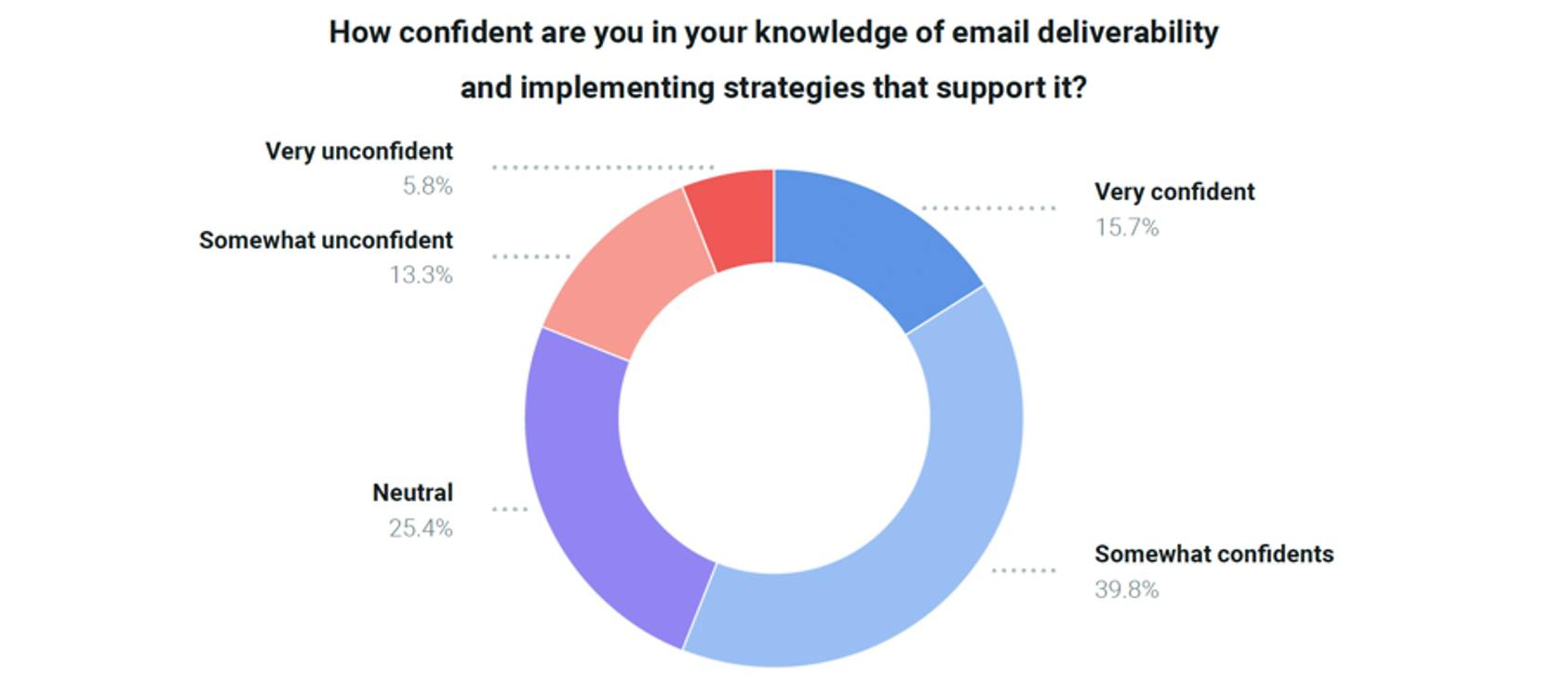
In addition, many marketers describe themselves either as somewhat or very unconfident in their ability to understand, manage or optimise for better deliverability (Figure 11).
Figure 11: 19.1% of email marketers doubt their capabilities for deliverability
Source: Mailgun by Sinch[12]
The topics covered in this section of the report outline in general terms the issues that can affect deliverability, while Section 6 covers what marketers can do to improve their chances of reaching the inbox.
5.1 Factors that influence email blocking
Why do some emails get blocked, and what can be done to minimise the chances that brand email messages will be flagged as spam?
Reduce delivery problems by keeping an eye on the following three main factors:
sender reputation, which can be enhanced by correctly setting up the mail server, a good IP address reputation, which is built by historically low spam complaint rates, and email content. Marketers should have a sound process for checking email content including copy and template characteristics, so that emails do not get caught in the spam filters.
Sections 5.2–5.5 look at some of the main issues that can cause emails to be reported as spam and provide recommendations to mitigate each issue.
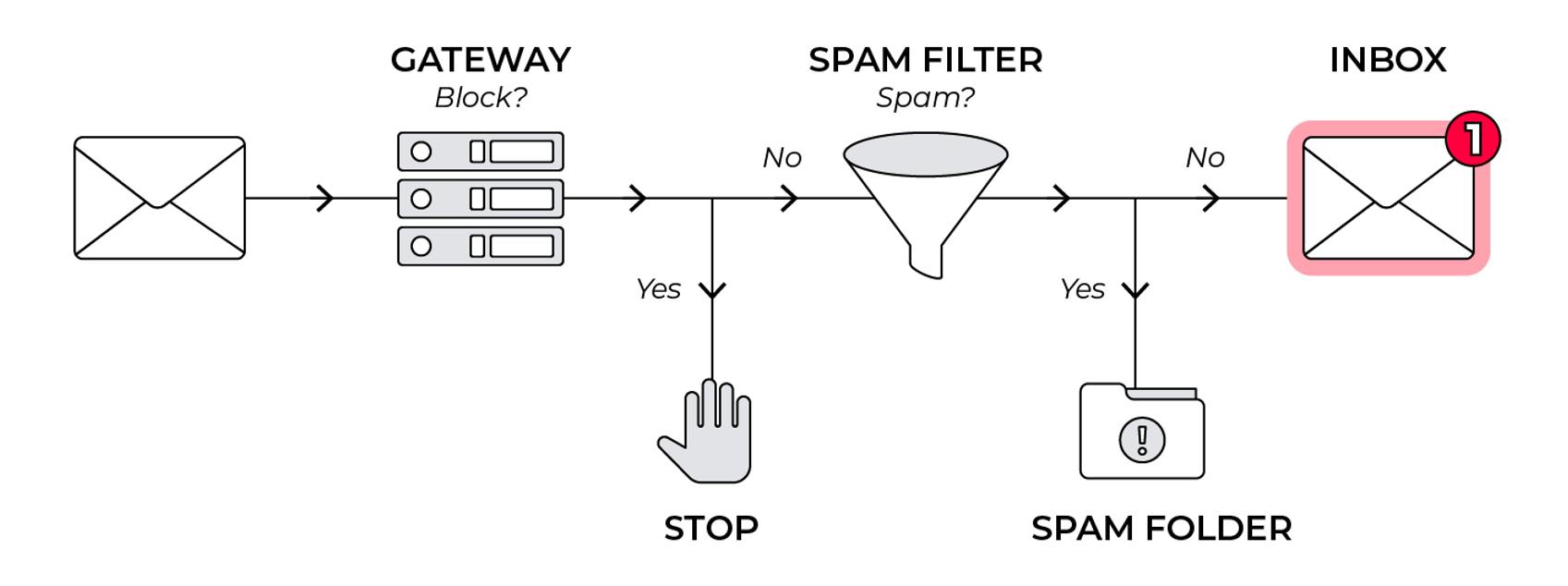
Figure 12: The path to the inbox
Source: Econsultancy
5.2 Factors that affect sender reputation
Sender reputation – a score assigned to email senders based on email campaign quality – largely depends on compliance with standards established by ISPs. The three biggest factors are as follows:
- Bounce rate – the number of messages that are returned as undeliverable divided by the number of emails sent. Spammers naturally have higher bounce rates, and higher rates of hard bounces. This is another argument for keeping email lists clean. Consequently, most ESPs suppress hard bounces from subsequent campaigns and have rules in place to deal with multiple soft bounces (where the email is temporarily non-deliverable).
.
Bounce rates vary by sector and company size, which is why ESPs often supply performance reports that benchmark lists against sectors.
- Complaint rate – the number of people who report email messages as spam divided by the number of emails delivered. When a recipient clicks on the junk or spam button within a webmail provider, such as Yahoo Mail, Outlook, AOL and Gmail, they are not only moving the email to the junk folder but also reporting it as spam to the ISP.
- Spam trap addresses – addresses thought by the ISPs to be inactive, or that have not opted into an email programme, that ISPs use to trace and catalogue spam. If a sender attempts to deliver to one of these addresses, a permanent block might be placed on the broadcast server. IP addresses can be added to blocklists after sending just one email to these trap addresses. For ISPs, the acceptable rates are reportedly in the order of one spam trap email per 200,000 emails.
The mitigations that (obviously, only well-intentioned) businesses can use to keep their bounce and complaint rates low, while avoiding spam traps, are set out below.
5.3 Establishing the server setup
The setup of the broadcasting mail server is not generally a concern for marketers managing the campaign, but for the reader’s information, a good email service provider or in-house IT team will consider the following:
- Sender Policy Framework (SPF):[13] This involves the broadcasting domain publishing a DNS (Domain Naming System) that shows it is a genuine sender.
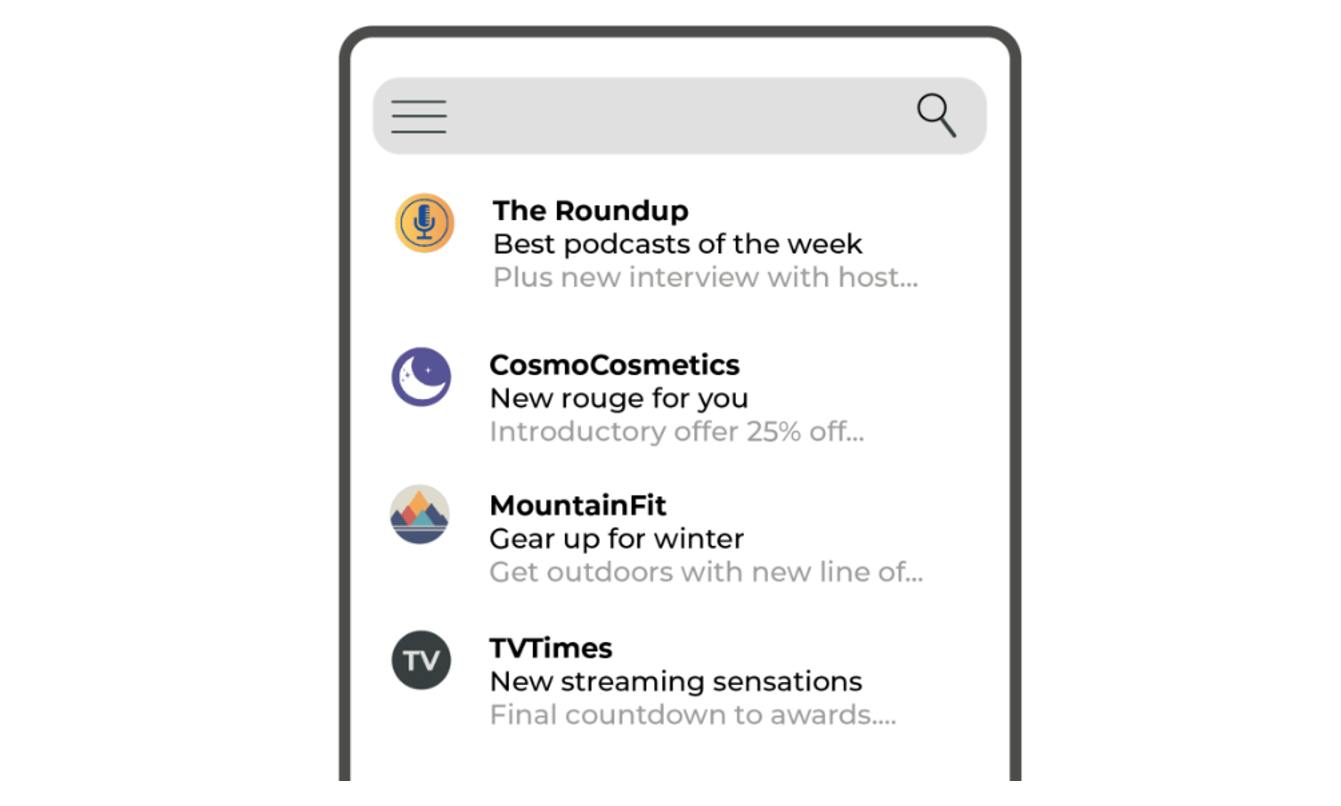
- Brand Indicators for Message Identification (BIMI):[14] This new standard allows authenticated brands to display their logos in recipients’ mailboxes next to their emails. This gives the brand more visibility in the inbox and also assures recipients that their messages are legitimate. Gmail and Yahoo Mail are the only major clients that support BIMI at the time of publication. Gmail has also launched an enhanced version of BIMI that includes a blue checkmark for accepted senders.[15] See Section 6.7 for an illustration and discussion of BIMI as an added trust factor.
- A and MX records: An ‘A’ record is needed for click and open tracking, while an ‘MX’ record is for emailing. This setup is needed to verify sending IP addresses and for replies/bounces to be routed back to the server.
- DomainKeys Identified Mail (DKIM):[16] This authentication protocol aims to combat domain spoofing and to help trace spammers. It is generally deployed alongside SPF. When the email is sent from a domain, it is encrypted using a private key that can only be used on the domain (effectively a digital signature). The receiving SMTP server then checks this digital signature against the public key for that domain – if it is an authenticated, genuine sender, they will match.
- Domain-based Message Authentication, Reporting and Conformance group (DMARC):[17] DMARC was set up in 2012 by 15 organisations, including some of the largest ESPs, financial institutions and message security companies in addition to the major ISPs. The aim was to standardise the way that message receivers perform authentication using SPF and DKIM. This goes a long way to help overcome rogues sending out phishing emails that appear to be from established brands...DMARC authentication is based on validating the ‘from’ field of emails, and is consistent across Outlook, AOL, Gmail, Yahoo Mail, Comcast and other email receivers using DMARC.
BIMI could be a ‘great motivator’ for trust and deliverability
“For brands, email deliverability may not be the biggest priority, because they might think it is too technical. They often follow the leads of their email service provider and whatever service it provides to get their emails in the inbox.
“BIMI finally pushed email deliverability, brand reputation and security to the forefront, simply because it is ‘visible’ in the inbox. It also increases trust with the sender. Therefore, BIMI is a great motivator for brands to sort out their basic setups for email authentication through SPF, DKIM and DMARC, which are all absolutely essential before going after BIMI.
“On the other hand, BIMI still needs a bit of branding, a bit more hype, maybe some influencers to promote it. When more ISPs enable it, it will have more interest.”
Beata Linz, Global CRM Director, AdBirds Global
5.4 Monitoring server blocklists
Frequently scanning and checking that sending IP addresses do not appear on blocklists is something an ESP or internal IT team can do to help ensure email deliverability. Spam filtering services use RBLs (real-time blocklists) to check inbound emails for known spammers.
There are two main types of blocklists: broadcast server-based (DNSBLs) and destination domain/link-based (SURBLs).
- DNSBLs (domain name service-based spam blocking lists) list the known IP addresses of servers that spammers use. A problem can occur if an email service provider or domain host has another company identified as a spammer within the same, similar or adjacent IP block to a reputable sender. Webmail providers access these lists to identify spam. SpamCop[18] is a well-known DNSBL.
- SURBLs (spam URL real-time blocklists) list the websites contained within links in the email that have previously appeared in spam messages (in some cases, depending on the age of the domain). If a situation does arise, the brand will need to visit the blocklist’s website and do a lookup on their IP address. Most blocklist databases will provide general listing reasons, but do not list specific email addresses tied to blocklisted IP addresses.
5.5 Getting the email volume right
Volume and frequency of email sends can affect IP reputation. A consistent reliable/regular volume is best (having and monitoring an email schedule can help manage this). Many spammers send infrequent, enormous blasts. Dramatically changing sending patterns or volumes can create problems, as ISPs may deem this as ‘spammy’ behaviour, so when planning to increase email volumes (e.g. for Black Friday), a careful warmup process is recommended.
Regular higher volumes with low complaint rates are viewed favourably, which is why many ESPs will put infrequent or low-volume senders on shared or pooled IP addresses. Brands that manage their own infrastructures in-house must bear in mind their planned sending volumes and frequency. If it is infrequent and high volume, splitting up into smaller, more frequent batches could help avoid blocking issues.
Applying the learning: How spam filters work
An email can be blocked for many reasons at the ‘gateway’, meaning it never even reaches a spam filter – let alone an inbox. ISPs are heavily involved in catching as much spam as they can before it even reaches email systems, albeit with the occasional ‘false positive’, when a genuine message never makes it through.
Spam filters usually use a combination of factors to assess whether to mark an email as spam, including the server reputation (at the level of IP address or sending domain). These factors are combined into an overall score that ultimately determines whether an email is marked as spam or not.
This means, for example, that the word ‘free’ could be used in the subject line for one campaign and it will be delivered, but not for another where other factors contribute to the spam rating. Likewise, an identical email that is delivered from one IP address may not be delivered on another.
Popular mailboxes such as Gmail, Outlook and Yahoo Mail play an increasing role in deliverability, in no small part due to the large volume of users they have accessing their webmail in real time. If a large group of Gmail’s 1.8 billion+ active users suddenly begins marking the same (or similar) messages as spam, that could provide for faster and more accurate detection than any combination of sender reputation and content.
The open source SpamAssassin is just one example of a tool that system administrators use to filter and block spam. It says it uses “a robust scoring framework and plugins to integrate a wide range of advanced heuristic and statistical analysis tests on email headers and body text including text analysis, Bayesian filtering, DNS blocklists, and collaborative filtering databases”.
The weightings of the individual factors are different depending on mailbox or ISP and will likely change as the process of spam prevention is optimised. Suffice to say: simply avoiding certain keywords within the subject line or body of an email is only one part of the picture.
Holistic Email Marketing
6. Best Practices for Managing Email Deliverability
The key to achieving best practice in deliverability is ensuring there is a procedure to check for potential delivery problems before broadcast. Senders who use in-house systems must ensure that their mail server is configured to minimise deliverability problems and that any potential delivery problems are reviewed after every campaign.
6.1 Test deliverability using tools
A key component of testing deliverability is reviewing the delivery of campaigns in different email clients such as Gmail, Outlook, Yahoo Mail and major corporate subscribers, and taking proactive actions to decrease spam percentages.
A distinction must be made between the delivery rate reported by the email broadcast platform (which includes emails classified as hard and soft bounces) and inbox deliverability, also known as ISP acceptance, which is where the email is not reported as a bounce but is routed to the spam or junk folder instead of the inbox.
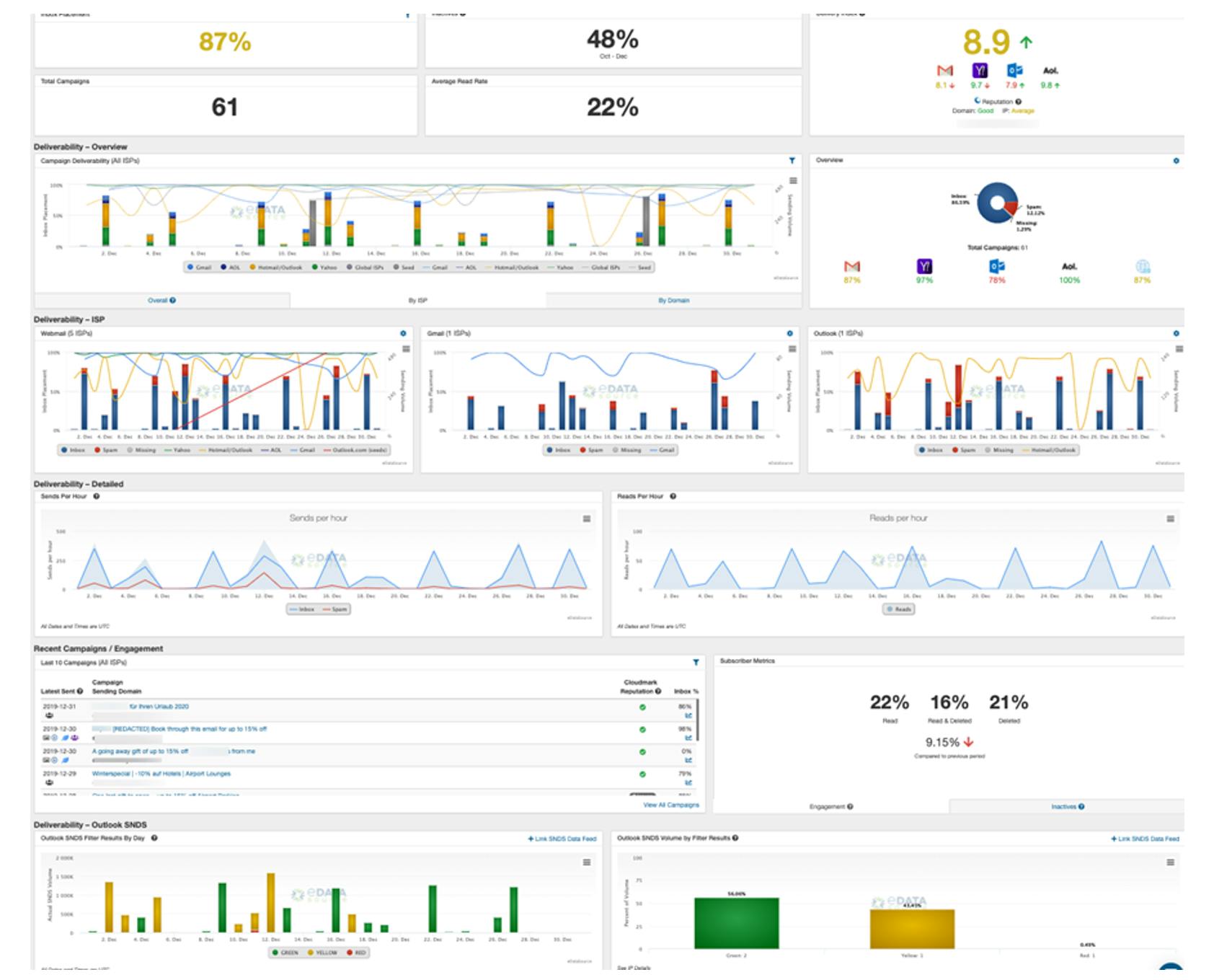
Tools like Sender Score[19] by Validity and Delivery Index[20] by MessageBird are free tools for benchmarking broadcast IPs against competitors, while suppliers like MessageBird’s Inbox Tracker[21] can help marketers assess inbox deliverability across different mailboxes and ISPs.
Seed lists can help track where ISPs route emails. They include ‘seed’ addresses, which let marketers see where an email gets delivered – the inbox or the spam folder. An improved version of these seed addresses, IntelliSeeds, was developed by MessageBird (Figure 13). These seeds are added to the distribution list and go out when a campaign is sent. Rather than simply marking where the email lands, the seed addresses use AI to virtually open the emails. In contrast, a regular seed does not register an open, so it can report no data back, similar to an inactive address.
Before sending emails, teams can use tools such as Litmus[22] and Email on Acid[23] to check the spam ratings of campaigns and how their campaign is performing against known filters.
Figure 13: Example of MessageBird’s Inbox Tracker dashboard for delivery and reputation
Source: MessageBird
6.2 Review content so that emails are not treated as spam
Take the following steps to ensure emails are not treated as spam:
- Check for use of spam keywords and other spam characteristics in every email to be sent. Ensure that each campaign does not exceed the threshold for ISP spam scores. Many ESPs and email testing platforms offer simulated spam score assessments.
- Do not use an IP address in links. An IP address (e.g. http://193.241.33.1/page/) should not be used in links to pages or images. Instead use full length, keyword-friendly URLs. This is because IP addresses are often used by phishers (would-be criminals who seek to dupe recipients into revealing personal or password information) to mask the true destination of a URL.
- Send email to seed addresses to check delivery for Gmail, Outlook, Yahoo Mail, etc. Additionally, use an inbox delivery tool checker before broadcast, such as MessageBird’s Inbox Tracker or Validity.
6.3 Act on emails reported as spam
Best practice is to have a feedback loop between the ISP or webmail provider and the sender so that emails reported as spam are removed from the list in the same way as if they have bounced. This prevents repeated reporting of emails as spam. It is important to monitor these complaints carefully and ensure they are suppressed from future sends. All good ESPs should have feedback loops in place with the major ISPs.
It is possible for a marketer or IT team to set up feedback loops if broadcasting from an in-house system, provided the brand owns the domain and sending IP. Many of these can be applied for online. Links for information on how to do this with the main mailbox providers are listed below (note that some will require a login).
- Yahoo Mail – https://senders.yahooinc.com/
- Outlook – https://mail.live.com/mail/services.aspx#JMRPP
- Comcast – http://feedback.comcast.net/
- Gmail – https://support.google.com/mail/answer/6254652?hl=en
It is also worth taking a closer look at the accounts that are reporting emails as spam to find commonalities such as a particular data source or ISP that is responsible for a disproportionate number of reports.
6.4 Act on bounce reports
Good bounce suppression, as well as removing address abandoners and other inactive addresses, is vital as many ISPs turn old or dead addresses into spam traps. This helps them to differentiate between genuine senders and those who are not. Maintaining a regular schedule of message sending is also important, as some ISPs may turn those inactive email addresses into spam trap addresses within as little as six months.
After a subscriber has been inactive for a prescribed period, an email can be sent encouraging them to continue receiving email or to unsubscribe (or automatically remove them if there is no response).
6.5 Prompt users to add the sending address to personal address books
Encourage recipients to add the sending address to their safe senders list or address book, so that even if the message has characteristics of spam, it is not placed in the junk folder. This can guarantee inbox delivery. It also means that emails will come through with images showing even if the default setting is for them to be off.
It is worth pushing this at the point of sign-up as it means that emails will come through from the very first message. Some companies add links to instructions on adding the sending address to the address book to emails sent to large lists.
Using this method does not excuse marketers from monitoring delivery, spam complaints, unsubscribes and hard bounces. The marketer must assume that not all recipients will take this step.
6.6 Make unsubscribe options clear
The laws of nearly every country regulating commercial email state that every email must contain unsubscribe instructions. Carefully word the unsubscribe method, so it does not look like that commonly used by spammers. As such, do not mention spam compliance. A statement of origination, such as “You are receiving this email because you subscribed to receive promotional emails on [date]”, or more informally, “Why am I receiving this email?”, along with an answer, is better.
It is important to note that spammers often use fake statements of origination. It is therefore advisable to check the text of the origination statement email against a filtering system before delivering the campaign.
An example of the common faked statement of origination is: “You signed up to this email on our website.” The statement of origination should explain either that the recipient has opted in, ideally with the place and time of opt-in, or that they are receiving it as they are an existing customer.
There are arguments as to whether to put the unsubscribe option in the header in addition to the footer since if a recipient really wants to remove themselves from the list, this option would be preferable to them immediately marking it as spam.
Many mailbox providers, including Gmail and Yahoo Mail, automatically convert the ‘list-unsubscribe’ feature in an email header into an unsubscribe link in the email. Figure 14 below illustrates this approach.
Figure 14: Unsubscribe link by the sender field in an email message

Source: Econsultancy
6.7 Provide visual reassurances that customers can trust the brand
Ensure the email branding is clear so that the company is easily identifiable. Email branding should be the same as the branding the user would have seen at time of signup. Put the company name, address and contact details in the email footer – this is a legal requirement in many countries. Include a customer service phone number if available.
Refrain from using a ‘no-reply’ address as the sending address. This causes frustration among users, resulting in higher complaints, and ISPs do not look favourably upon their usage. Use a sender or ‘from’ name that recipients will recognise and use subject lines that are in keeping with the brand image and equity.
In addition, continually monitor the email inbox where replies to messages are delivered. Using a ‘no-reply’ email address will not stop subscribers from replying to the message. An automated filtering service or script can help to weed out personal replies from auto-reminders, out-of-office notifications and other replies.
Also, consider taking the steps required to make brand emails eligible for inclusion in the BIMI (Brand Indicators for Message Identification) programme. This allows the sender to use a branded image in the small icon next to its sender name in a mobile inbox, as seen below in Figure 15.
Figure 15: An inbox showing branded icons for senders with BIMI, and one without
Source: Econsultancy
6.8 Review deliverability for all campaigns
Today, delivery metrics, particularly bouncebacks, spam complaints, inbox acceptance rates and unsubscribe levels are as important as opens, clicks and conversions and it is important to monitor these on a campaign-by-campaign basis. These should be included in email goals and KPIs (see Email Marketing Best Practice: Setting Goals and Measuring Performance).
Compare each campaign to the previous history of delivery rates to determine whether deliverability is trending up or down, and if it is the latter, then act on it.
Review unsubscribe and spam complaint rates in combination with open rates. Decreasing spam complaint rates are not always good news. If this decrease happens at the same time as open rates drop, it could mean emails are going to the junk folder.
7. Conclusion
As demonstrated, list quality and high rates of delivery into the inbox go hand in hand. Of the two, list quality must come first. If the list is not maintained, it is practically impossible to expect authentication protocols that are part of the deliverability process to demonstrate that a sender’s emails deserve to go to the inbox instead of the spam folder or virtual wastebasket.
The Mailgun by Sinch survey[24] assessing marketers’ attitudes towards list quality and deliverability is worth reading because it calls for a rapprochement between two historical antagonists: the email team and the IT team. Both sides must work together to lay the foundation for better list quality and deliverability and to do the work required, not only to improve the quality of the email database, but also to reap the benefits of that improved quality in a better sender reputation. Both lead to the goal of delivering more email messages to the people who have requested them.
That united approach can help the email marketing programme gain the recognition it so often lacks as a major player for driving greater streams of revenue and engaging a larger percentage of the audience, which will reward the company for its investment in email and justify the faith email marketers have always had in the channel.
7.1 Key takeaways
- List growth should be a key objective for the email team. However, goals for list growth should centre on acquired email addresses with informed, active consent rather than purchased or rented third-party lists or forced opt-ins.
- Review quality of email data and begin a regular system of checks to maintain it.
- Track and test all tactics, going beyond just reviewing the conversion rate. Track and measure the quality of new customers over time, so that it is easy to identify the most fruitful tactics and sources.
- Design and implement list growth tactics so that they are as customer-centred as possible. Such tactics can include repositioning the form on a website so it is above the fold, implementing a popover, using Facebook to gain subscribers, or using PPC to drive traffic. Focus on customers and their objectives, needs and desires at all times – this will achieve the best results.
- Although mailbox providers determine whether an email will be delivered to the subscriber’s inbox or the spam folder or will be permanently blocked, there are many tools and tactics available to senders to improve deliverability and establish the brand as a trusted sender – use them.
- Authentication is a must-have for all sending domains and IP addresses.
- Continuously monitor deliverability. Use inbox testing to gain visibility into whether emails are being delivered into the spam folder or inbox and to prevent recurring deliverability problems.
- Make email unsubscribing as easy as possible. Adding friction to the journey can exact a high price in spam complaints, which then affects deliverability.
- Single issues generally do not cause widespread deliverability problems. Problems are usually due to the cumulative effect of multiple errors over time. This is why all factors of any email strategy and implementation can influence deliverability – both positive and negative. From email frequency to coding, infrastructure to copy and creative – the list is enormous, but marketers have the tools to understand and improve each of these factors.
8. Further Reading
8.1 Econsultancy email marketing reports
Econsultancy | Quick Guide to Why Email Still Matters
https://econsultancy.com/reports/quick-guide-why-email-matters/
Econsultancy | Email Marketing Best Practice: Setting Goals and Measuring Performance
https://econsultancy.com/reports/email-marketing-setting-goals-measuring-performance/
Econsultancy | Email Marketing Best Practice: Segmentation and Personalisation
https://econsultancy.com/reports/email-marketing-segmentation-personalisation/
Econsultancy | Email Marketing Best Practice: Communication Strategy
https://econsultancy.com/reports/email-marketing-communication-strategy/
Econsultancy | Email Marketing Best Practice: Copywriting
https://econsultancy.com/reports/email-marketing-copywriting/
Econsultancy | Email Marketing Best Practice: Layout and Creative
https://econsultancy.com/reports/email-marketing-layout-creative/
Econsultancy | Email Marketing Best Practice: Testing and Optimisation
https://econsultancy.com/reports/testing-email-marketing/
8.2 Other Econsultancy reports and articles
Econsultancy | Customer Lifetime Value Best Practice Guide
https://econsultancy.com/reports/customer-lifetime-value-best-practice-guide
Econsultancy | Bloom & Wild put the customer first with Mother’s Day opt out
https://econsultancy.com/case-studies/view/bloom-wild-put-the-customer-first-with-mothers-day-opt-out/
Econsultancy | A day in the life of… an email deliverability consultant
https://econsultancy.com/blog/68036-a-day-in-the-life-of-an-email-deliverability-consultant
8.3 Other reports, articles and resources
Validity | 2023 Email Deliverability Benchmark Report
https://www.validity.com/resource-center/2023-email-deliverability-benchmark-report/
DMA | 2023 Consumer Email Tracker
https://dma.org.uk/research/consumer-email-tracker-2023
Mailgun by Sinch | The State of Email Deliverability 2023
https://www.mailgun.com/resources/research/state-of-deliverability-2023
Only Influencers | 0% to 100% in Gmail? Yes, it happened and here’s how
https://www.onlyinfluencers.com/email-marketing-blog-posts/best-practice-email-strategy/entry/pay-0-to-100-in-gmail-yes-it-happened-and-here-s-how
AuthIndicators Working Group (Brand Indicators for Message Identification) homepage
https://bimigroup.org/
Holistic Email Marketing | Give your email team the keys to the marketing database
https://www.holisticemailmarketing.com/blog/give-your-email-team-the-keys/
MarTech | Holiday email opt-outs: Right intentions, wrong response?
https://martech.org/holiday-email-opt-outs-right-intentions-wrong-response/
LashBack | Unsubscribe Blacklist
http://blacklist.lashback.com/
DMARC | Resource base
http://www.dmarc.org
Talos | Reputation Lookup
https://talosintelligence.com/
Apache | SpamAssassin
http://spamassassin.apache.org
SURBL checker
http://lookup.uribl.com/